Innova-Nation · Colegio Agustiniano
The color tells you when it's no longer.
FreshTag is a smart label that uses a natural anthocyanin indicator to show, with a simple color change, how fresh a food item is — no sensors, no battery.
Fresh
pink · pH ≈ 5.5
The anthocyanin indicator is at its original shade. The food is in optimal condition.
The problem
The expiration date is a generic estimate, not a real data point
Two packages with the same printed date can be in completely different states of freshness, and there's no way for the consumer to know just by looking at the label. The result is two opposite problems happening at once: good food gets thrown away, and food that's no longer safe gets eaten.
0
metric tons
of food wasted in households in 2022 — 60% of all food wasted across the entire supply chain
Food Waste Index Report 2024, UNEP
0
cases / year
of foodborne illness, with 420,000 associated deaths
WHO, 2015 reference report
0
of the burden
of that disease burden falls on children under 5, who make up just 9% of the world's population
WHO
0
of the population
— 2.4 billion people — faced moderate or severe food insecurity in 2022
SOFI 2023 Report, FAO/IFAD/UNICEF/WFP/WHO
0
of global emissions
of greenhouse gases come from food loss and waste — almost 5 times the emissions of the entire aviation industry
UNFCCC, citing UNEP/FAO, 2024
The science
Anthocyanins: the same pigment in purple cabbage
Anthocyanins are natural pH-sensitive pigments. In an acidic environment they're pink or purple; in a basic one they shift toward blue or green. As food spoils, it releases volatile amines and ammonia that make the environment more basic — and that's exactly what FreshTag's indicator translates into a visible color change.
Cyanidin — the anthocyanidin in purple cabbage · flavylium cation + 5 hydroxyls · drag to rotate
Detects gas, never touches the food
As meat spoils, it releases volatile biogenic amines — alkaline substances that spread through the sealed air inside the package without any liquid contact. The indicator lives inside a small breathable sachet, the same principle as a tea bag: it lets gas through and blocks liquid. That way the food's condition can be sensed without ever touching it.
Gases detected (biogenic amines)
- Ammonia
- Trimethylamine
- Putrescine
- Cadaverine
Two chemistries, the same in-app consume verdict
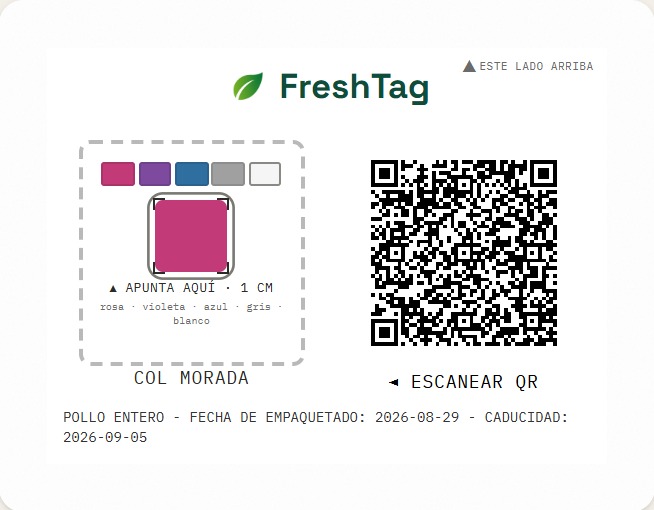
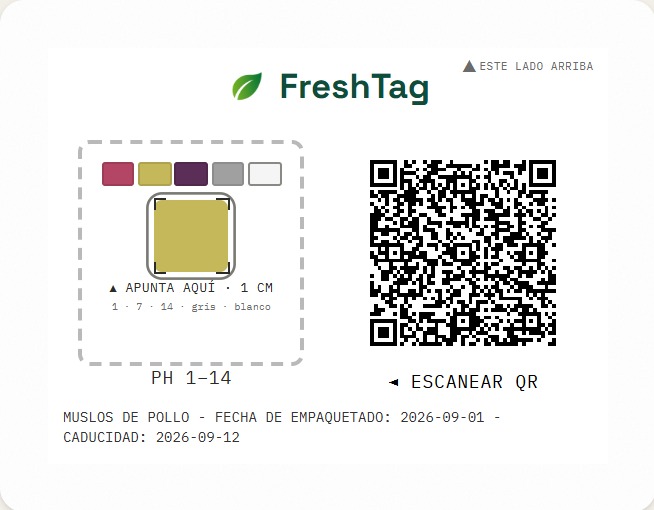
There are two labels. Purple cabbage (anthocyanins): pink / violet / blue. Universal Aoke pH 1–14 meter: the QR carries the type and the app reads the number. In both cases the consume verdict comes from the app itself — fresh, eat soon, or do not eat — not from the AI. The AI, when a connection exists, only suggests what to do next.
Why two chemistries instead of one
Purple cabbage extract is homemade: it has to be prepared and it degrades over time, so it depends on staying fresh. Universal pH paper is commercial, standardized, and cheaper to produce at volume — no prep, no freshness window for the indicator itself. Each chemistry also performs better with certain products and pH ranges than the other, so having both covers more real cases than either one alone. Neither replaces the other: both are functional technologies today, and which one fits depends on the product and each one's own limitations — not on one being “better” overall.
Sandwich structure, 3 layers
So meat juices don't wash out the sensor, the indicator is never directly exposed — it's protected between a visible face and a filter that only lets gas through.
01
Front layer — consumer-facing
Conventional clear plastic (PET/PP) with the QR code and reference color scale printed on it.
02
Middle layer — sensor
A porous matrix impregnated with the anthocyanin indicator. This is the part that reacts.
03
Back layer — gas filter
A hydrophobic microporous membrane (Tyvek-type or waxed paper): repels meat juices but lets gas through to reach the sensor.
The last step is automatic: bring the phone close and the QR aims the box and picks cabbage or pH meter. You see whether it is fresh and whether you can eat it — same three verdicts on both labels.
Accessible by design, not as an afterthought
The color scale wasn't chosen for the chemistry alone — it also had to work for people who can't rely on color at all.
01
Outside the red-green axis
Pink, violet, and blue don't collapse into each other under red-green color blindness — the most common type, affecting close to 8% of men — unlike a traditional green/yellow/orange/red traffic-light scale.
02
Never color alone
The status always appears as a word too — “Fresh,” “Starting to spoil,” “Do not eat” — never just a colored circle.
03
The app already reads it out loud
An optional feature, turned on with a speaker icon under “Scan”: it announces the status the moment it changes, for people with low vision or blindness who can't rely on color at all.
Thinking about the planet
Future vision — not yet implementedHonesty first: today's prototype isn't compostable. The indicator is — the rest of the label isn't yet.
01
The indicator is already 100% natural
Purple cabbage (anthocyanins): an edible pigment, not a synthetic dye. It's food-safe by nature, not because of some added certification.
02
The rest of the layers, today, aren't
The front layer (PET/PP) and the back membrane (Tyvek or conventional waxed paper) are ordinary plastic — they work well, but they aren't compostable.
03
On the road to a compostable version
Clear bioplastic (PLA or cellulose acetate) for the front layer, and plant-wax paper or a cellulose membrane for the back — same principle, smaller footprint. The same ambition Oscillum already shows with its biodegradable label.
The real lever: preventing waste, not shrinking the label
As shown above, food loss and waste account for 8-10% of global greenhouse gas emissions — almost 5 times the entire aviation industry's. Against that scale, the footprint of manufacturing one label — a few grams of paper and plastic — is negligible next to the footprint of producing the food it's attached to. That's why FreshTag's real environmental contribution isn't the label's physical size (it was shrunk anyway, since it costs less and changes nothing else), but how much food it helps avoid wasting, through four mechanisms already working today:
- •Detects decomposition already underway before it gets eaten unknowingly — the real-time color reading.
- •Advises at the right moment: before buying, it suggests skipping a violet or blue product; once it's already yours, it tells you how to discard it safely — the same AI tip, adapted to whether you're still deciding or already bought it.
- •Reminds you to eat a product before it expires — a local notification scheduled 24 hours before the expiration date, already built into My Products.
- •Lets a spoiled product on the shelf be reported so it's pulled before another customer buys it — Report to the store, blue readings only.
Honesty first, again: there's no real field data yet on how much food has actually been saved from waste thanks to FreshTag — it's a pilot, not a mass-deployed product, and that number can't be invented. What is verifiable is the scale of the problem these four mechanisms attack together, and that their combined footprint is orders of magnitude smaller than the footprint of the food they help save. That said: the real reason to build FreshTag was never the label's material — it's that four simple, already-working mechanisms (read, warn, remind, report) attack a problem of this scale directly, and that combination is worth more than any material optimization on its own.
Technical specs
The essentials, at a glance
Indicator
Purple cabbage anthocyanins on filter paper or agar-agar gel
Universal pH meter
Aoke pH 1–14 strip (10×10 mm pad). The QR marks t:p; the app reads the number and applies the same verdict: pH under 6 fresh, under 7.2 spoilage, 7.2 or above do not eat. That “not fit to eat” comes from the app, not the AI.
Label size
74 × 55mm — 30×30mm panel and QR (quiet zone on the QR); 10×10mm reading pad with calibration patches. The QR anchors the pad and picks cabbage or pH on its own.
Traceability
QR code linked to a digital data sheet (batch, process, estimated expiration)
Prototype cost
US$15–30 (30–40 test labels), cents per additional label
Production at scale
Continuous roll-to-roll line: flexographic QR printing, reagent injection, and membrane lamination — US$0.015–0.03 per label
Strengths
- +The chemical principle is backed by peer-reviewed research — it's not an idea without support.
- +A double signal — color plus QR — that doesn't rely on blindly trusting a generic printed date.
- +It integrates with infrastructure that already exists (scale and thermal label), rather than replacing it.
- +With a connection, AI only suggests what to do after a spoilage or do-not-eat reading (cabbage or pH meter). “Do not eat” comes from the app; the reading never depends on the internet.
- +The label prints two calibration patches (gray and white); the app corrects the sampled color for ambient light before classifying it, instead of comparing the camera's raw RGB.
- +The app picks purple cabbage or the universal pH meter on its own as soon as it reads the QR — never a manual choice — and confirms it with a small icon (a leaf for cabbage, a drop for pH) in the viewfinder, without naming the chemistry on screen.
Honest limitations
- –The 48h calibration run is already underway with real strips — it's a live experiment today, not just a procedure on paper — but the measured data hasn't been published yet.
- –Purple cabbage now gives a continuous pH estimate too (not just pink/violet/blue), interpolated in color space; the universal pH meter gives 1–14 directly. In both cases the app maps that reading to the same consume verdict — but the cabbage interpolation's anchors are still 3 reference points, not the real measured curve; that's exactly what the ongoing calibration will replace.
- –It has no validation from any health authority: it is not presented as a guarantee of food safety.
- –Color classification is local math (CIE Lab). A vision model could be trained later, but it is not required for the consume verdict today.
Evidence
Not an isolated idea
The same principle — detecting food spoilage through the gases or color it produces — already has real-world cases, some of which started as student projects.
Oscillum
Elche, SpainA biodegradable label that shifts from yellow to blue depending on the freshness of meat and fish. Named among the world's 10 most promising young innovations at the European Patent Office's Young Inventors Awards 2025.
Mimica Touch
United KingdomIt started as an industrial design thesis ('Bump Mark') that won the UK national round of the James Dyson Award 2014. Today it's funded by the Seafood Innovation Fund and Innovate UK — the student-to-product path this project treats as a reference.
Purple cabbage research
Foods journal, Oct. 2024Peer-reviewed studies confirm that purple-cabbage-anthocyanin indicator films detect spoilage in meat, fish, and shrimp with good sensitivity — the same principle FreshTag uses.
PEGS
Imperial College LondonA paper sensor with printed electrodes and an NFC chip that detects ammonia and trimethylamine. It doesn't use color, but it confirms that sensing spoilage gases inside packaging is a real research priority today.
The project
An Innova-Nation pilot
FreshTag was born through Innova-Nation, the school entrepreneurship and innovation program at Colegio Agustiniano Nuestra Señora del Buen Consejo. Today the physical label is a chemical prototype being calibrated; the app is being built in parallel so the demo works start to finish.
What the app looks like today
Real, not a mockup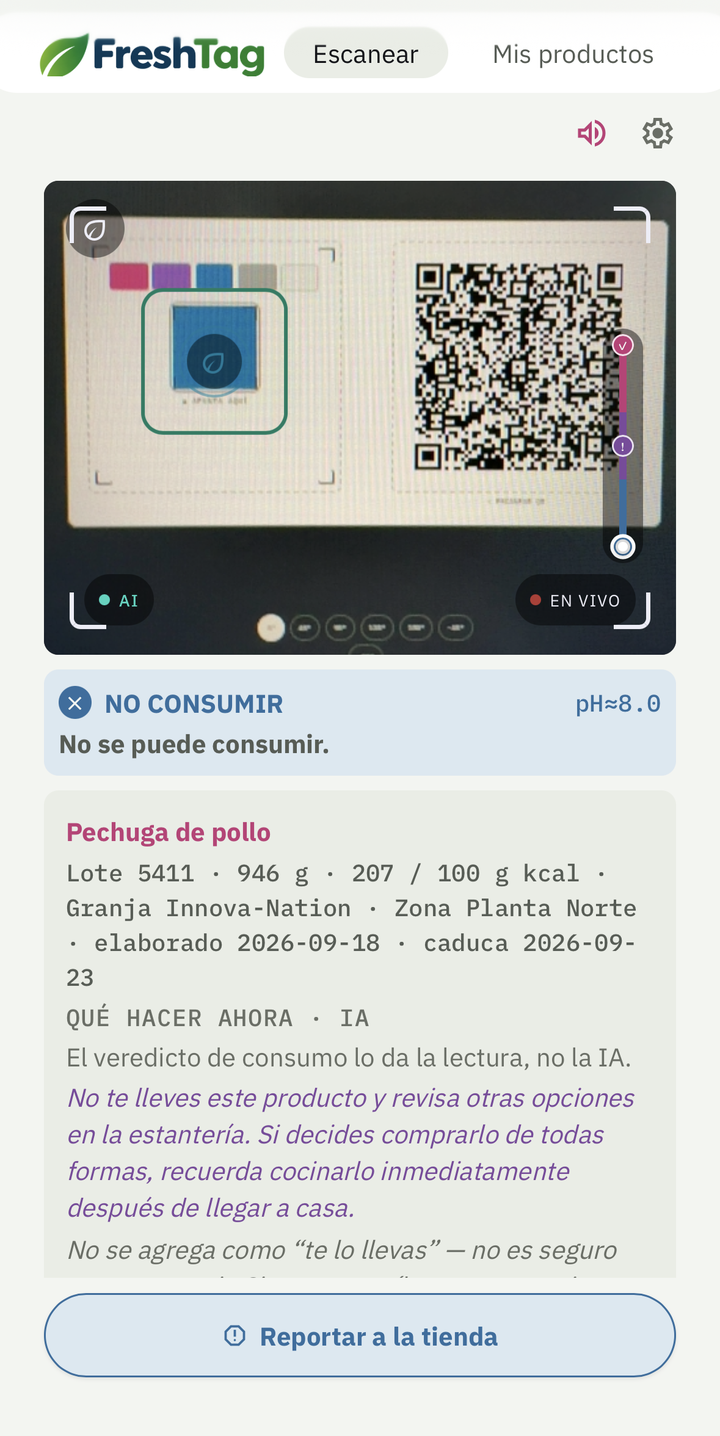
01
Scan
The camera turns on by itself when you open it — no home screen, no capture button.
- •Hold the label in frame: the QR is required. The code anchors the pad and tells the app how to read the color. There is no mode in settings.
- •The app tells you fresh, early spoilage, or do not eat. That comes from the reading, not from a name printed on the label.
- •Detects the QR code with the same camera, at the same time.
- •Before saving anything it asks "Are you taking this product?" — nothing gets added without confirming, and an ignored tap counts as "no."
- •If the product is already in My Products, it says so instead of duplicating it.
- •Every state can be read aloud (optional speaker icon) and always carries a glyph, not just a color.
- •Same scale as the physical label: pink, violet, or blue — no more mismatch between what the app says and what the package says.
- •If the reading comes back blue, a "Report to the store" button appears — only then, so it never invites reports on a product that's still fine. It composes a message with the product and lot number and hands it to the phone's own share sheet, so a store employee can verify and pull it from the shelf without waiting for someone else to notice.
- •If the reading is spoilage or do-not-eat (cabbage or pH meter) and there's a connection, it can ask AI what to do next — not whether the food is safe: the reading already said that. Offline, the app works the same.
- •If you bought something blue without scanning it first, an "I already have it" button still adds it to My Products — so you know how to discard it safely, not to encourage eating it.
02
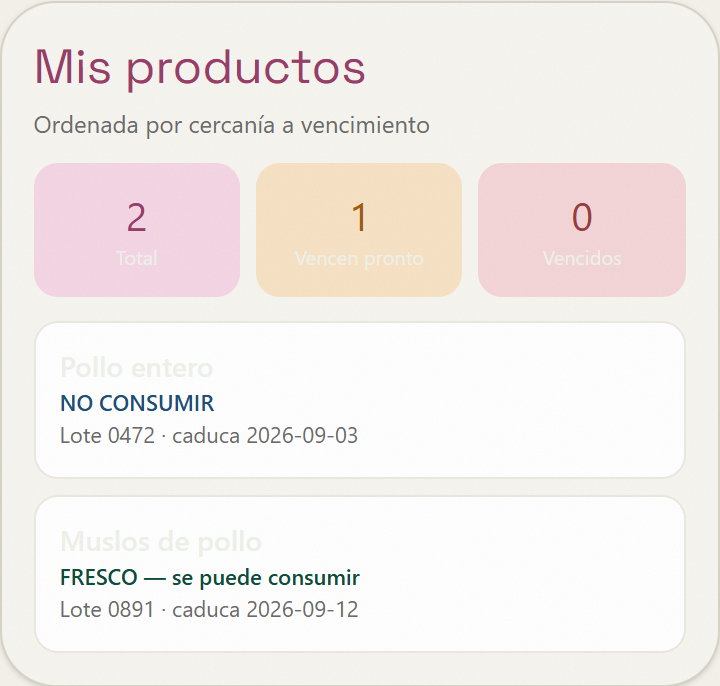
My Products
The list of scanned products, sorted by how close they are to expiring.
- •Total, "expiring soon," and "expired" counts at a glance.
- •Real expiration reminders, with a clear notice when they're unavailable (Expo Go, the web version).
- •Add a product by hand, with a built-in QR generator for printing onto the label.
- •Each product opens a detail sheet with its data, the last in-app consume reading (if it was scanned), and a recipe idea.
- •Light, dark, or system appearance — independent of the phone's own setting.
Report to the store: closing the loop from detection to pull
Blue readings onlyCatching a spoiled product doesn't help much if no one who can act finds out in time. So when a reading in Escanear comes back blue, a button appears to report it directly to whoever can pull it from the shelf — without saving anything on any server.
01
Only when there's real risk
The button only appears on a blue reading — it never invites a report on a product that's still fine.
02
A message, ready to send
It composes the product name, lot number, and estimated pH, then hands it to the phone's own share sheet — WhatsApp, email, whatever the person reporting already uses.
03
The store can act first
A store employee can verify and pull the product from the shelf without waiting for another customer to notice.
Same philosophy as the rest of the app: nothing leaves the phone except what you choose to share. A version with a per-lot report count and a store-manager panel exists as a future step, gated on the project moving forward — see the technical spec.
AI tip, only when it matters
Illustrative sketch — not a real captureWhen the app's reading already said spoilage or do not eat — cabbage or pH meter — and there's a connection, Gemini can suggest what to do. It never decides whether the food is fit to eat: that comes from the local reading. Offline, or when the food is fresh, the app looks the same.
Chicken breast
Lot 4 · expires 2026-09-10
What to do now · AI
Discard it in a sealed bag. Don't cook it — heat doesn't remove the toxins.
A sketch of the result screen — the tip's text is generated by Gemini at the moment of each reading, it's never fixed text like this example.

Now on your phone
Install the APK directly on Android, or open the installable web version (PWA) from any browser — no app store needed.
Android will warn about an "unknown source" — that's expected, it doesn't go through Google Play yet.
Works on any phone. On iPhone, install it via Safari's "Add to Home Screen."